
User Tools
This is an old revision of the document!
Viewing the Forum on a Mobile Device
If you are viewing the forum on a smartphone, tablet, e-reader, or similar device, you may choose to use a theme designed for mobile devices.
We currently have two different mobile themes available:
- MyBB GoMobile
- Orion Mobile
Both of these themes provide basic functionality, allowing you to read and post on the forum, access your User Control Panel, and so on. However, some functions, such as the ability to view Alerts and Unread Messages, are not available with these mobile themes. We recommend that you experiment with these themes to see which one you prefer. You can always choose to use the default (“desktop”) theme instead.
Switching from Mobile to Desktop Theme
In Orion Mobile:
- Click “Themes” at the bottom of the page.
- A dropdown list is displayed, allowing you to choose from all of the available themes.
- Select “Default” from the list to switch to the regular desktop theme.
In MyBB GoMobile:
- Click “Switch to Full Version” at the bottom of the page to switch to the regular desktop theme.
Switching from Desktop to Mobile Theme
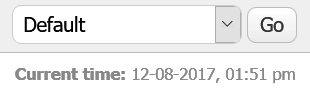
To switch from the default or “desktop” theme to one of the mobile themes, do the following:
- Scroll to the bottom of the page and look for the “Quick Theme Select” dropdown in the lower right-hand corner. It should say “Default”, as shown above.
- Click on the dropdown to display all the available themes.
- Select “Orion Mobile” or “MyBB GoMobile” from the list.


