
change_avatar
This is an old revision of the document!
An avatar is a small identifying image shown under the author's name whenever they make a post.
The maximum dimensions for avatars are: 100×150 pixels.
The maximum file size for avatars is 60 KB.
To add or change your avatar, follow these steps:
- Click on User CP at the top of the page to go to the User Control Panel.

- Scroll down until you see “Edit Profile” and click on the option to “Change Avatar”.
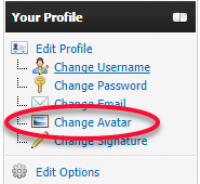
- You may either (1) upload a file that exists on your computer; or (2) use an URL to link to an avatar on the internet.
- Upload an Avatar
- Select Choose File
- Navigate to the location of your desired picture/avatar
- Select the desired image
- Select “Change Avatar”
- Avatar URL
- In the box provided, enter the URL location of the avatar you desire
- Select “Change Avatar”


Please keep in mind that your avatar selection must adhere to the copyright rules of this forum. In brief, photographs and drawings are copyrighted material. Unless you took the photo or made the drawing yourself, or have permission from the person who did, you can't post it on the Forum.
change_avatar.1512644052.txt.gz · Last modified: by waynesowry